The local AI creation tools that change the game

Tomás Celoira
Monday, December 15, 2025
5 minutes

Local AI tools introduce a new way of working with AI by allowing creators to run powerful models locally, combining control, flexibility, and open-source freedom. Pinokio together with tools like ComfyUI, Kohya SS, and N8N, it enables deep customization, LoRA training, and automated workflows without relying on cloud-based platforms or token-based pricing. This approach empowers users to fully own their AI processes, redefining how and where AI creation happens.
Let’s talk about Pinokio: The local AI Cloud that’s changing the game
In the world of artificial intelligence, tools are evolving nonstop. More and more solutions promise to make the creation of images, voices, videos, and even 3D models easier. But among all these options, there’s one that's getting the attention of many creators because of its unique approach: Pinokio.
What is Pinokio?
Pinokio is a cloud-style application capable of running multiple AI models locally on your machine. Today, we can split AI tools into two big groups:
Consumer AI: tools like Midjourney, DALL·E, Firefly, or NanoBanana, designed to generate visually appealing results quickly, without requiring technical expertise.
Professional AI: platforms like ComfyUI, A1111, Wan Video, or Hunyuan3D, that offer deep control over the final output—but come with a steeper learning curve.
Pinokio places itself right in between: it combines the flexibility and control of professional tools with the accessibility of a modern interface and an open ecosystem.
ComfyUI: The power of visual customization
Ever created an image with Midjourney or DALL·E and felt like the result wasn’t quite what you imagined?
That’s because these models usually offer limited control beyond basic features like inpainting or mixing images.
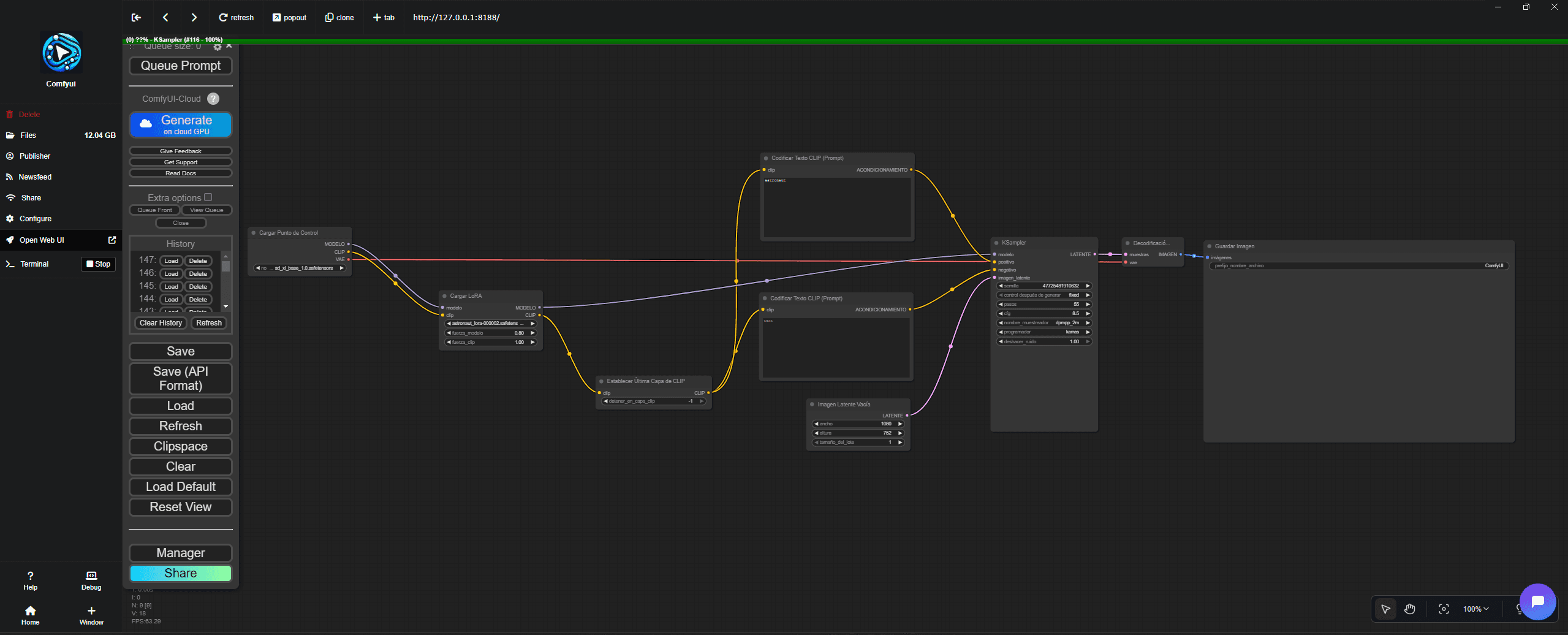
That’s where ComfyUI comes in, a modular interface that allows you to generate images using Stable Diffusion models. It works with base models like SD 1.5 or SDXL, offering a great balance between performance and hardware requirements.
ComfyUI lets you finely adjust every step of the generation process by connecting nodes and designing custom workflows. It’s essentially a visual environment for designing how your model “thinks.”
So if you're wondering, “Why bother with a more complex tool?” the answer lies in the freedom and full control you gain when working with open-source tools.
Open Source: Pinokio’s true value
Pinokio is completely open source, meaning anyone can contribute, share, and improve apps within its ecosystem.
And the best part? It’s free.
Unlike commercial platforms that charge through tokens or credits, Pinokio lets you run models directly on your own computer using your CPU or GPU. So what would cost money in services like DALL·E, Meshy3D, or ElevenLabs can run locally on Pinokio at no extra cost.
LoRAs: Personalizing the DNA of your AI
What is a LoRA?

LoRA (Low-Rank Adaptation) is a technique that allows you to fine-tune large pretrained models—like Stable Diffusion 1.5 or SDXL—without having to retrain them from scratch.
Instead of modifying all parameters, LoRA adds low-rank matrices trained on a specific dataset: an artist’s style, a person, a character, or even an object.
Common Applications
Artistic styles: training a LoRA based on a specific visual style or artist.
People or characters: teaching the model to reproduce traits of a person or character.
Objects or props: ideal for unique products or elements.
How it works
Start with a base model (Stable Diffusion 1.5 or SDXL).
Inject LoRA layers that understand a specific domain.
When generating an image, the LoRA influences the result depending on the configured strength.
The image is generated with the desired interpretation of a person, object, or character.
Advantages
Very lightweight files (10 MB to 200 MB).
Allows multiple variations of the same base model without duplicating gigabytes.
You can combine several LoRAs in a single image (e.g., style + person + lighting).
Training LoRAs with Kohya SS Trainer
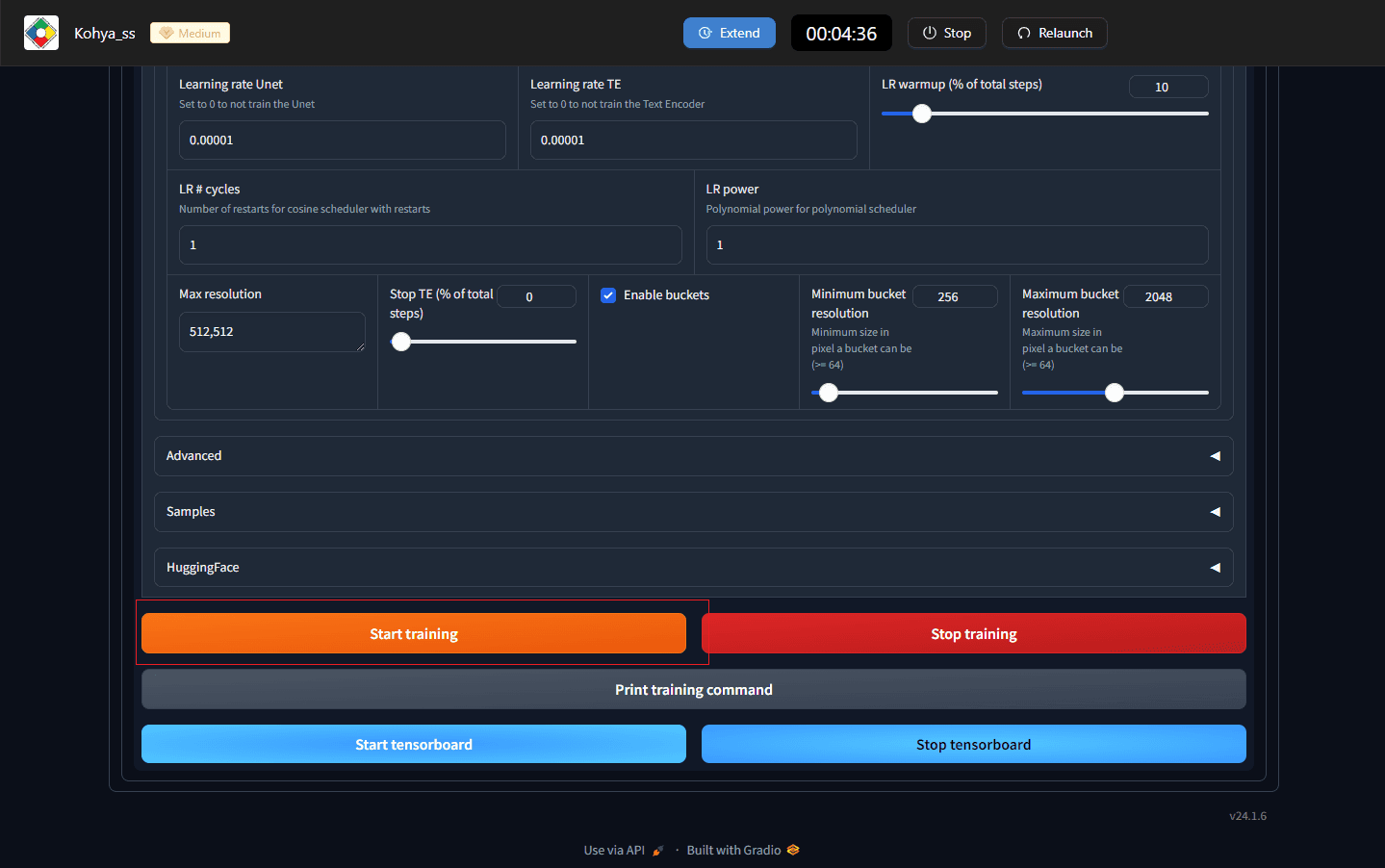
Kohya SS Trainer is a graphical interface designed to configure LoRA training parameters.
To train a LoRA, you need two types of data: images and descriptions.
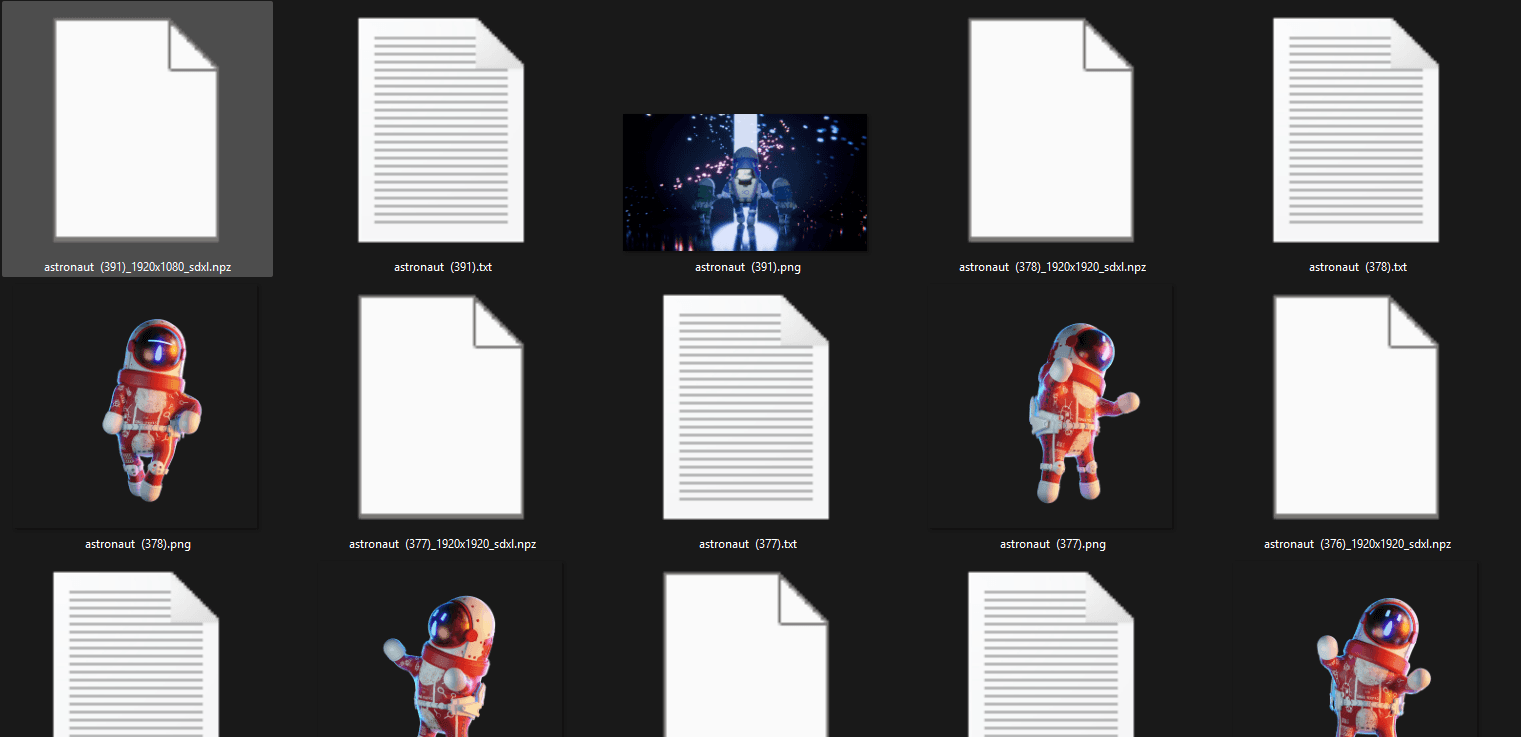
Each image requires a .txt file with the same name containing a visual description. This can be written using tags (e.g., suit, red, futuristic) or as a full sentence (“a red futuristic space suit”).
Choose whichever style matches how you normally prompt.
When training a LoRA, it’s useful to think about concepts the base model already understands. For example, if you want the model to learn “Darwie,” you might start from the concept “astronaut” and then fine-tune the style.
That base keyword, “astronaut,” is used across all .txt files in the dataset.
Automation with N8N
Once you’ve configured your models and workflows, the big question is:
How do you automate this whole process?
That’s where N8N comes in—a tool that allows you to create automated task flows.
Imagine you need to generate a batch of 50 images. The AI does most of the heavy lifting, but there are still steps worth automating.
A basic workflow could:
Load the list of titles or concepts to generate.
Ask an LLM to create a unique prompt for each title.
Send each prompt to ComfyUI to process locally.
Select the appropriate workflow (e.g., apply LoRAs).
Save each image with its original title.
(Optional) Choose a specific save folder.
Conclusion
Pinokio, together with tools like ComfyUI, Kohya SS, and N8N, represents a new way of working with AI: more flexible, more controlled, and entirely in your hands.
The future of AI creation isn’t only in the cloud—it’s also in how we bring it into our local environments.
——
If you're interested in building your AI, contact us and let's build your project together!
Related Blogs
If you found this Blog insightful, you might also be interested in these related articles exploring similar topics in tech, design, and digital strategy.